
AI Tax Planning and Expense Tracking for Small Business: The 2026 Guide
AI Tax Planning and Expense Tracking for Small Business: The 2026 GuideAI tax planning and expense tracking software now does more than scan receipts — the better tools continuously flag deductions, track sales-tax nexus as you grow into new states, and forecast what you’ll owe before the quarterly deadline hits. QuickBooks Online with Intuit Assist is the natural starting point if you’re already on that platform, Ramp fits agencies that want card and spend data auto-coded to the GL, and Keeper or FlyFin suit freelancers who want AI deduction-finding paired with a CPA-reviewed return.
Table of Contents
Why This Matters for Small Businesses Right Now
AI Tax Planning and Expense Tracking for Small Business: The 2026 Guide
AI use among small businesses has climbed fast enough that last year’s numbers already undersell it. Intuit QuickBooks’ own tracking survey found regular AI use among US small businesses hit 68% by April 2025, up from 48% the previous July — and it kept climbing to 77% by January 2026. The U.S. Chamber of Commerce separately found 58% of small businesses used generative AI in 2025, up from 40% in 2024 and 23% in 2023. Worth noting: those numbers measure general AI use, not accounting-specific adoption — a narrower slice of that group is actually using AI inside their bookkeeping or tax workflow specifically, which is the more relevant number for this category.
The push toward automation has a real staffing story behind it, too. The accounting profession is genuinely short-staffed: the Bureau of Labor Statistics projects well over 120,000 accounting and auditing job openings annually through the mid-2030s, the AICPA’s own trend data shows a shrinking CPA exam pipeline, and roughly 75,000 CPAs are expected to retire within the next five years. That gap is a real, practical reason small firms and solo practitioners are automating the routine parts of tax and expense work — not because a specific new regulation demands it, but because there simply aren’t enough people to do it manually at the old pace.
What These Tools Actually Do
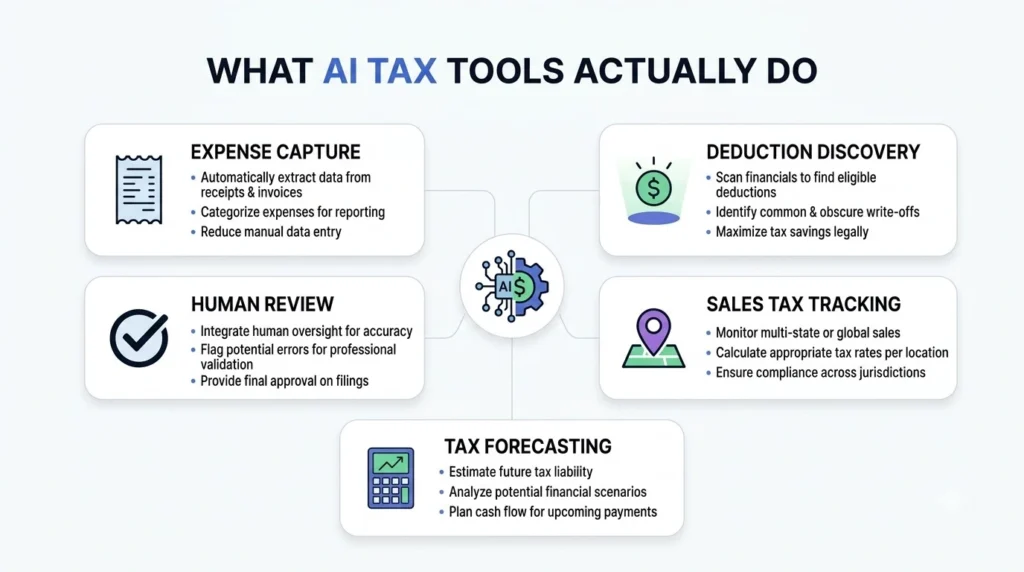
- Automated expense capture and categorization — OCR and NLP pull data from receipts, invoices, and card feeds, then classify expenses into IRS-aligned categories with a confidence score, cutting down on manual entry and miscoding.
- Real-time deduction discovery — instead of a once-a-year scramble, AI scans transactions continuously to flag deductible expenses, depreciation opportunities, and credits like Section 179 as they happen.
- Sales tax and nexus tracking — applying the correct rate by jurisdiction and flagging when growing revenue in a new state creates a filing obligation, which is easy to miss manually once you’re selling in more than a handful of states.
- Quarterly estimate forecasting — predictive models estimate what you’ll owe each quarter and model how a decision (a new hire, an equipment purchase) shifts that number and your cash runway.
- Form prefill and audit-ready documentation — pre-filling Schedule C, 1120-S, K-1 inputs, and 1099s, while keeping a documented trail of the data and logic behind each figure.
- Human-in-the-loop review — the tools worth trusting with an actual filing pair AI output with a real CPA review rather than shipping a return on AI judgment alone.
Comparing the Top Platforms
| Platform | Best For | Strengths | Watch Out For |
|---|---|---|---|
| QuickBooks Online + Intuit Assist | US SMBs already on QuickBooks | Native AI inside the most widely used SMB platform; strong auto-categorization after a learning period; deep accountant familiarity | Built for single-entity businesses — multi-entity or AP-heavy firms tend to outgrow it; promotional pricing often steps up after the first few months |
| Ramp | Agencies and tech companies wanting unified spend + AI coding | Every card and bill-pay transaction auto-coded to GL, department, and class; vendor reports 3x faster close on internal benchmarks | Core card/expense features are free, but bill-pay fees apply; best paired with QuickBooks or an ERP for actual tax filing, not a replacement for one |
| Keeper / FlyFin | Freelancers and solo service businesses | AI scans transactions for missed deductions, with full return prep and CPA review; strong fit for Schedule C and 1099 workflows | Subscription-based; not built for complex multi-entity or partnership returns, and multi-state nexus still needs human oversight |
| Zeni / Pilot / Botkeeper | VC-backed startups and agencies wanting outsourced finance | End-to-end AI bookkeeping with real-time CFO-style dashboards (burn, runway), reviewed by human accountants | Outsourced model means less in-house control; custom pricing; not built for DIY tax filing |
Also worth knowing about: Vic.ai for enterprise-grade AP automation, BILL for AP/AR workflow, and TurboTax Live or H&R Block AI Tax Assist for DIY filers who want AI-assisted prep with an optional human review layer.
Building a Quarterly Tax Workflow: 5 Steps
- Connect your bank and card feeds first. Deduction discovery and categorization are only as good as the transaction data feeding them.
- Turn on continuous deduction scanning, not just year-end review. Catching a deductible expense in March is more useful than finding it in a January scramble.
- Set a quarterly estimate reminder tied to your actual forecast, not a flat number carried over from last year — a slow quarter or a new hire should shift what you set aside.
- Run a scenario before a big decision. Before hiring or buying equipment, check how it moves your quarterly tax liability, not just your bank balance.
- Route anything unusual to a human before filing. A changed vendor, an unfamiliar deduction category, or multi-state activity is exactly where AI categorization is most likely to get something wrong.
What AI Can’t Do For You Yet
Be clear-eyed about the limits here, because the person who signs the return is legally responsible for it, not the software. AI handles routine Schedule C, straightforward S-corp, and expense-tracking work well. It’s meaningfully less reliable — and needs real CPA oversight — for multi-state nexus questions, K-1 partnership allocations, foreign income, and R&D credit claims, where the rules have enough edge cases that pattern-matching against past transactions isn’t sufficient. Vendor-reported figures on “average deductions found” (commonly cited in the $3,000–$5,000 range for self-employed filers) are marketing claims from the companies selling the tool, not independently audited results — useful as a directional signal, not a guarantee for your specific return.
Common Mistakes Small Businesses Make
- Filing on AI output with no human review. The liability for an incorrect return doesn’t transfer to the software — treat AI categorization as a first pass, not a final answer.
- Ignoring nexus until it’s a problem. Sales tax obligations in a new state show up quietly; a tool that tracks this proactively is worth more than one that just processes what you already know about.
- Waiting until year-end to look at deductions. Continuous scanning exists specifically so you’re not trying to reconstruct a year of receipts in April.
- Choosing a tool by feature list instead of entity complexity. A tool built for Schedule C freelancers isn’t the right fit for a multi-entity business, and the reverse is just as true — overbuying complexity costs time you don’t need to spend.
Also Checkout – The Best AI Workflow Automation Tools for Small Business in 2026
FAQs
Can I fully automate my small business taxes with AI in 2026? AI can reliably handle routine Schedule C work, straightforward S-corp filings, and ongoing expense tracking, but complex situations — multi-state nexus, K-1 partnerships, foreign income, R&D credits — still need CPA review before you file.
How does AI find tax deductions I might miss? It connects to your bank and card feeds, classifies transactions using learned patterns, and flags deductible expenses continuously through the year rather than only at filing time. Vendor-reported averages on deductions found are a useful signal but aren’t a guarantee for your specific business.
Is AI tax software safe and audit-proof? Reputable platforms maintain audit trails and strong security practices, but “audit-proof” isn’t a real guarantee any tool can make — the signing preparer, whether that’s you or your CPA, remains legally responsible for the return. Choose tools with clear human-review options for anything beyond routine filing.
What’s a good AI accounting and tax stack for a small agency? A common setup pairs Ramp for card spend and auto-coding, QuickBooks Online with Intuit Assist for core bookkeeping and tax prep, and Keeper, FlyFin, or a CPA for final return review — balancing automation with the human check that complex filings still need.