
The best AI workflow automation tools for small business in 2026 pair no-code building with real AI reasoning — reading, classifying, and acting on information instead of just shuttling it between apps. EasyClaw tops this list for a specific reason: it’s the only tool here that controls desktop software directly, letting it automate legacy apps with no API at all, while Zapier, Make, and n8n remain the strongest all-around picks for the cloud tools most small businesses already run on.The Best AI Workflow Automation Tools for Small Business in 2026
Table of Contents
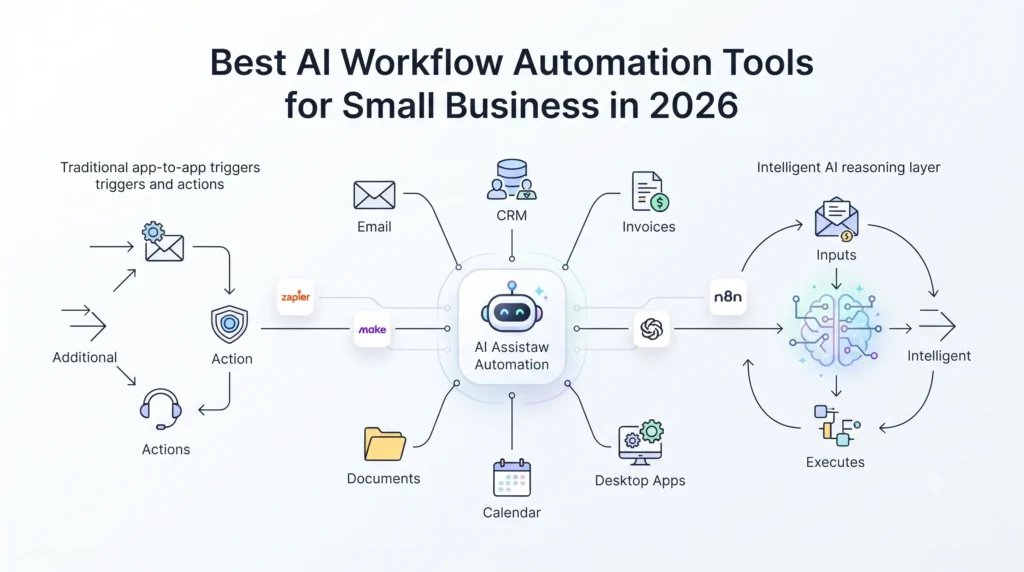
What “AI Workflow Automation” Actually Means Now
Traditional automation moves data on fixed rules: form submitted → row added to a spreadsheet. It’s reliable for predictable, structured tasks, and it breaks the moment an input doesn’t match the pattern it expects — which is most of the time, since invoices arrive in different formats, customer emails need judgment calls, and your systems don’t all speak the same language.The Best AI Workflow Automation Tools for Small Business in 2026
AI workflow automation adds a reasoning layer on top of that plumbing. It can open an email, decide whether it’s a real lead, draft a reply in your voice, and update the CRM — without anyone writing an explicit rule for every possible scenario. That’s the shift the industry is calling “agentic” automation in 2026: less wiring flowcharts, more delegating outcomes.
Why This Matters for US Small Businesses Right Now
Adoption numbers vary a lot depending on who’s asking and how broadly “using AI” is defined — anywhere from under 40% to the high 80s across different 2026 surveys. Rather than pick the most flattering number, here’s what holds up across multiple independent sources:
- The global workflow automation market is valued at $23.77 billion in 2025 and is on track to reach $40.77 billion by 2031 (a 9.41% CAGR) — and within that market, small and midsize enterprises are growing faster than the overall average, at roughly a 10.19% CAGR, according to Mordor Intelligence’s 2026 industry report.
- The Upwork Research Institute’s Q1 2026 survey of 750 US business leaders found that among SMB leaders (10–99 employees), 34% are actively piloting AI agents for workflow automation specifically, and 32% already consider AI agents mission-critical to their strategy.
- Salesforce’s Small & Medium Business Trends Report found 75% of SMBs are experimenting with or using AI, with 71% planning to increase investment over the next year; 91% of those already using it say it’s boosting revenue.
- A 2026 Business.com/Dialog survey of 1,009 US respondents found 62% of small businesses have at least partially adopted AI in both marketing and customer service — the two functions where adoption is furthest along, ahead of HR, finance, and operations.
The pattern across all of them is the same even where the exact percentages differ: adoption is rising fast, and it’s concentrated in marketing, customer service, and back-office busywork first.
The Top 10 AI Workflow Automation Tools for Small Business
Pricing on tools like these shifts often — treat the numbers below as a 2026 snapshot and confirm current rates before you buy.
| # | Tool | Best For | Starting Price (2026) | Standout Feature |
|---|---|---|---|---|
| 1 | EasyClaw | Automating desktop apps with no API | Free tier; paid from ~$20/mo | Controls the desktop UI directly — clicks, types, navigates like a person |
| 2 | Zapier | Broadest app integration | Free tier; from ~$20/mo | 7,000+ integrations, plus new autonomous “Zapier Agents” |
| 3 | Make | Visual multi-step workflows | Free tier; from $9/mo | Flowchart-style builder for complex branching logic |
| 4 | n8n | Developers & self-hosted control | Free self-hosted; Cloud from $20/mo | Deepest native AI/LangChain integration (70+ AI nodes) |
| 5 | Pipedream | Code-level customization | Free tier; from ~$29/mo | Real Node.js/Python/Go code inside workflow steps |
| 6 | Lindy AI | Autonomous multi-step agents | Free tier; from ~$50/mo | Persistent agents for inbox, scheduling, meeting prep |
| 7 | Gumloop | AI-native visual building | Free tier; from $37/mo | Describe a workflow in plain English, get a working canvas |
| 8 | Relay.app | Human-in-the-loop approval | Free tier; from ~$19/mo | Built-in approval step before AI output ships |
| 9 | Workato | Governance at scale | Custom (~$10K+/year even at entry) | SOC 2 / HIPAA / GDPR compliance, 1,000+ connectors |
| 10 | Vellum | Teams building their own AI features | Free tier; usage-based | Prompt versioning and evaluation for custom AI products |
1. EasyClaw — Best for Desktop-Level Automation
Every other tool on this list talks to your apps through an API. EasyClaw is the exception: it operates your computer’s actual interface — opening programs, clicking buttons, filling in fields — the same way a person would. That matters if your business runs on something with no modern integration path: an aging accounting package, an on-prem POS system, a scheduling tool your industry never bothered to build an API for. It runs locally, so your data doesn’t leave the device, and it can be triggered or monitored remotely through Slack, Telegram, or WhatsApp. The tradeoff: it’s a newer product with a smaller library of documented workflows than the more established platforms below, so it solves a specific, real problem rather than replacing a general-purpose integration platform.
2. Zapier — Best for App Integration Breadth
Zapier remains the widest connector catalog in the industry, now past 7,000 apps, and it’s added “Zapier Agents” — autonomous AI systems that execute multi-step tasks without a human triggering each one — plus an AI Copilot that builds Zaps from a plain-English description. It’s still the fastest path for a non-technical team that just needs App A to talk to App B. The catch: costs climb with task volume, and its AI features layer on top of the existing automation engine rather than being built around it from scratch.
3. Make — Best Visual Workflow Builder
Make’s flowchart-style canvas makes multi-branch logic easier to follow and debug than Zapier’s linear builder, at a lower starting price. It added “Make AI Agents” and a governance layer called “Make Grid” in 2026. It’s a strong fit for a small business that has outgrown simple one-step Zaps but doesn’t want the complexity of a fully open-source tool.
4. n8n — Best for Developers and Self-Hosted Control
Since n8n 2.0 shipped in January 2026, it’s arguably the most AI-native builder on this list — native LangChain integration, an AI Agent Tool Node, persistent agent memory, and 70+ AI-specific nodes. Self-hosting it is free, which matters for businesses that want full control over where their data lives. The tradeoff is a steeper learning curve than Zapier or Make.
5. Pipedream — Best for Code-Level Customization
Pipedream lets you drop real Node.js, Python, or Go code into a workflow step when the no-code builders hit their limits, while still handling triggers and connections for you. One thing worth knowing if you’re betting on it long-term: Workday announced an agreement to acquire Pipedream in November 2025, and while self-serve pricing has stayed intact through 2026, its roadmap is now part of a much larger enterprise HR/finance company’s plans.
6. Lindy AI — Best for Autonomous Multi-Step Agents
Rather than wiring a flowchart, Lindy lets you spin up a persistent AI agent that owns a task end to end — monitoring an inbox, booking meetings, prepping notes before a call. It’s a genuinely different mental model from the canvas-based tools. It’s also the priciest entry point on this list at roughly $50/month for the paid tier, and its integration library is smaller than Zapier’s.
7. Gumloop — Best AI-Native Workflow Builder
Gumloop’s visual canvas treats AI reasoning as a first-class building block rather than an add-on, and it’s popular with technical teams running scraping, lead-gen, or document-processing pipelines. Pricing is credit-based, which is transparent but can get expensive fast if you’re running high-volume workflows, and there’s a real learning curve for non-technical users.
8. Relay.app — Best for Human-in-the-Loop Approval
If you want AI drafting customer emails, summarizing calls, or enriching records — but a person signing off before anything actually goes out — Relay builds that approval step into the workflow itself instead of leaving it up to you to remember. It’s a good match for teams that are automation-curious but not ready to hand over fully autonomous execution. Its integration catalog is smaller than Zapier’s or Lindy’s.
9. Workato — Best for Scaling Businesses, Not the Smallest Ones
Workato brings real enterprise governance — SOC 2, HIPAA, and GDPR compliance, over 1,000 connectors — but it doesn’t publish self-serve pricing, and market-rate estimates put even its entry tier at roughly $10,000–$25,000 a year. That’s a reasonable price for a business that’s scaled past “small,” not for a five-person shop still deciding on its first automation.
10. Vellum — Best for Teams Building Their Own AI Features
Vellum is a different category from the rest of this list. It’s not for automating your existing back office — it’s for a team building a custom AI feature into their own product, like a support chatbot or a document-extraction pipeline, with tools for prompt versioning, multi-model testing, and evaluation. Worth knowing about if “workflow automation” for you actually means shipping AI into your own software rather than automating internal operations.
Also checkout the – best AI Client Onboarding Automation: A 2026 Guide for Digital Agencies
How to Choose the Right Tool: A 5-Step Framework
- Map your biggest manual time-drain before you shop for tools. Pick the process that costs the most hours or produces the most errors, and write out exactly what a human does today — that map is what you’ll actually be automating.
- Match the tool to your team’s real technical comfort level, not the longest feature list. A powerful platform nobody on your team can maintain is worse than a simple one everyone actually uses.
- Check where your data goes. Most tools on this list route your data through a cloud workflow engine; EasyClaw is the exception, running locally. That distinction matters more if you’re in a regulated industry or handling sensitive customer records.
- Automate one workflow completely before starting a second one. A single automation that actually works end-to-end beats five half-built ones.
- Set a monthly review. Track hours saved and errors caught, and be honest about what isn’t earning its subscription fee.
Where Small Businesses Usually Get This Wrong
- Buying the tool before mapping the workflow. Almost every credible 2026 guide on this topic flags this as the most common misstep — automation gets bolted onto a messy process instead of a clean one.
- Letting subscriptions pile up without talking to each other. It’s easy to end up with several AI tools that don’t share data, each one paid for in full.
- Skipping the human-review step on anything customer-facing or financial. The tools that build in an approval step (Relay.app, for instance) exist because fully autonomous execution isn’t always the goal.
- Writing off automation entirely after one failed pilot, when the more common explanation is that the specific tool or workflow was the wrong fit — not that automation itself doesn’t work for a business this size.
FAQs
What’s the difference between AI workflow automation and traditional automation? Traditional automation moves data between apps on fixed rules — if X happens, do Y. AI workflow automation adds a reasoning layer: it can read, classify, decide, and act on information without a rule written for every possible scenario, which is what lets it handle messier, less predictable work.
Is AI workflow automation safe for small businesses to use? Generally yes, but “safe” depends on where your data actually goes. Most tools on this list are cloud-based, so it’s worth checking a vendor’s data processing agreement before feeding it sensitive customer or financial information. EasyClaw is the one exception here, since it runs locally rather than routing data through a cloud engine.
Which AI workflow tool is best for a small business just getting started? For most small businesses connecting everyday cloud apps — email, CRM, forms, invoicing — Zapier or Make are the easiest starting points. If your specific bottleneck is an older desktop app with no API, that’s the one job EasyClaw solves that the others can’t.
How much does AI workflow automation cost for a small business? Most of the tools here have a usable free tier, with paid plans starting anywhere from about $9 to $50 a month depending on the platform and how much automation volume you need. Enterprise-focused platforms like Workato are priced for companies that have scaled well past “small” — expect five figures a year even at their entry tier.