
Best AI Project Management Software for Agencies in 2026
Best AI Project Management Software for Agencies in 2026. AI project management software for agencies now generates task plans from a brief, drafts status reports, flags at-risk deadlines, and answers questions about your workspace — but on ClickUp, Asana, and monday.com, that AI bills separately from the seat price you’ll see advertised, sometimes doubling or tripling your real per-user cost. Notion is the exception worth knowing about: its AI is genuinely bundled into the $20/seat Business tier rather than metered on top of it.
Table of Contents
Why Agencies Are Adopting This Faster Than the Adoption Stats Suggest
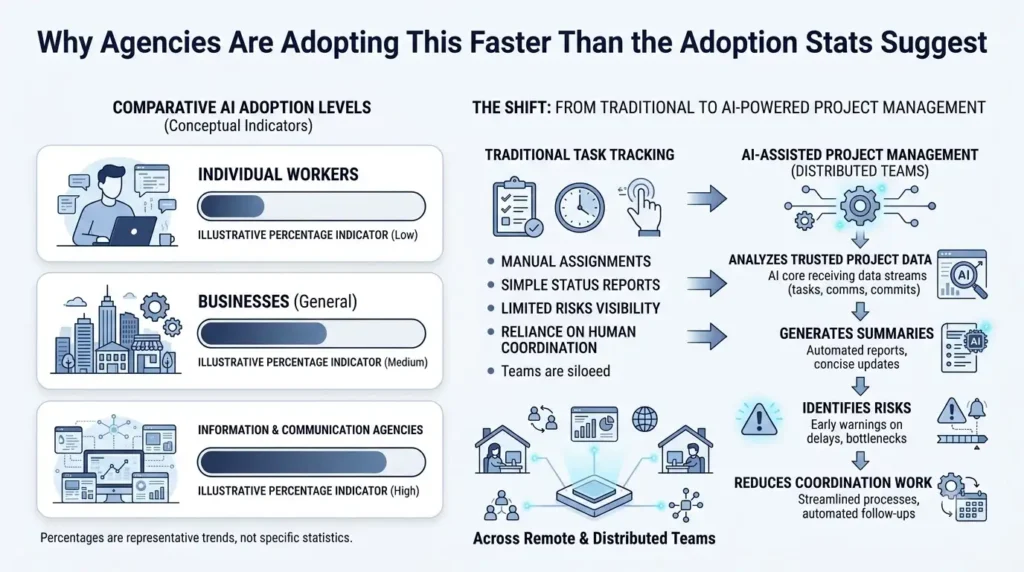
Best AI Project Management Software for Agencies in 2026. Adoption numbers in this category swing wildly depending on exactly what’s being measured, so it’s worth being precise about which figure you’re citing. The UK’s Office for National Statistics found AI use among businesses with 10+ employees climbed from about 12% in late 2023 to 35% by June 2026, reaching 58% in the information and communication sector specifically — the sector most agencies sit in. Worker-level generative-AI usage runs somewhat lower and favors the US: early-2026 estimates put it at 43% of US workers versus roughly 36% of UK workers. Zoom out to firm-level executive surveys, though, and the numbers jump again — around 78% of US firms and 71% of UK firms report using at least one AI technology in some form. Three legitimate numbers, three different pictures, because they’re measuring different things. Don’t let anyone — including this article — quote a single adoption percentage without asking what exactly was counted.
What’s consistent: information-and-communication businesses (the sector covering technology, marketing, design, and software agencies) sit near the top of every adoption measure, at nearly three times the rate of some lower-adoption sectors. The collaboration-software market itself is sizable and growing steadily — one estimate puts it around $15.15 billion in 2026, rising to $17.43 billion by 2030, while the broader remote-work software category is projected higher still. The market’s center of gravity has genuinely shifted from task tracking toward AI-assisted work management — the differentiator is no longer whether a tool has a chatbot bolted on, but whether AI can act on trusted project data without a human having to verify every step.
Even so, adoption stays shallower than the headline percentages suggest: UK businesses using AI deploy an average of only 1.4 to 1.6 AI technologies, and just 10% describe their use as extensive. Most agencies are experimenting with AI assistance, not redesigning their delivery workflow around it — which tracks with what actually shows up in a remote agency’s daily friction. A co-located manager notices a blocked task informally, in a hallway conversation. A distributed manager has to infer the same problem from a stale task field, a missed Slack message, or a calendar change. AI status summaries and risk alerts genuinely reduce that coordination tax — but only when the underlying project data stays accurate, which is a discipline problem the software can’t fully solve on its own.
What These Tools Actually Do
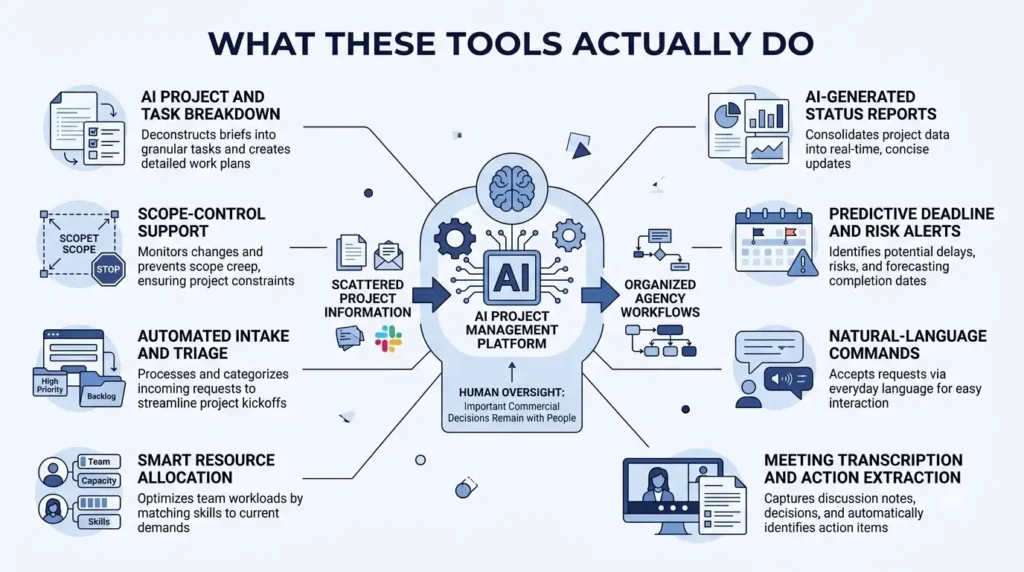
- AI project and task breakdown. Converts a client brief, meeting transcript, or plain-language description into milestones, tasks, dependencies, and suggested owners — useful for onboarding new accounts or standardizing recurring agency work like campaign launches.
- AI-generated status reports. Summarizes completed work, blockers, and upcoming milestones, cutting the time an account manager spends assembling a weekly client update from three different tools.
- Predictive deadline and risk alerts. Flags overdue tasks, dependency conflicts, and milestones approaching without enough completed work behind them, so a PM can intervene before a launch date is actually at risk.
- Natural-language commands. “Which client projects are at risk this week?” or “draft a status update for the client” instead of learning a filter syntax — genuinely useful for non-technical agency staff.
- Meeting transcription and action extraction. Turns a call into a transcript, summary, and assigned follow-ups automatically, which matters most at agencies where requirements tend to surface mid-call and otherwise get buried in someone’s notes.
- Smart resource allocation. Flags overloaded or underused team members based on workload and deadlines — catching the moment a developer is about to be double-booked across two urgent launches before it becomes a crisis.
- Automated intake and triage. Routes new requests by project, priority, or client so work stops entering through untracked email threads.
- Scope-control support. AI can flag language that looks like a change request; a human still needs to approve the commercial consequence — the estimate change, the timeline shift, the client conversation.
The Catch: The Seat Price Almost Never Includes the AI You’re Actually Buying It For
This is the section worth reading before pricing anything out, because it’s remarkably consistent across three of the four major platforms.
ClickUp’s Brain AI is not included in any plan — including Enterprise. It’s a separate add-on layered on top of every paid tier: $9/seat/month for Brain AI, or $28/seat/month for the fuller “Everything AI” tier. The detail most comparisons miss: it’s billed on every paid seat in the workspace once enabled, not opt-in per user — a 30-person Business team turning on Brain AI pays for all 30 seats even if only five people actually use it. A Business seat at $12/month becomes a $21/month seat with Brain AI, or $40/month with Everything AI.
Asana’s AI Studio is nominally included from the Starter tier ($10.99/seat/month), with a monthly credit allowance — 50,000 credits on Starter, 75,000 on Advanced. That sounds generous until a team actually automates real workflows with it; multiple independent cost breakdowns report heavy users needing AI Studio Plus (roughly $150/month for 100,000 additional credits) or burning through enough credits that the effective AI cost runs into the hundreds of dollars per user per month on top of the seat price.
monday.com moved to a mandatory “seats plus AI credits” model on May 6, 2026. New customers now purchase AI credits alongside seats as a required part of the plan, with minimums by tier (1,000 credits on Basic, 2,000 on Standard, 3,000 on Pro) at roughly $0.01 per credit on annual billing. The credit pool has also been getting hungrier: as of July 20, 2026, the Sidekick AI assistant — previously free for limited use — started drawing from the same credit pool.
Notion is the exception. Since Notion retired its standalone AI add-on for new customers in early 2026, full AI — the Notion Agent, Enterprise Search across connected apps, and AI Meeting Notes — comes genuinely bundled into the Business plan at $20/seat/month, with no separate metering except for heavier Custom Agent automation.
The practical upshot: when you’re comparing plans, ask specifically how AI is metered — a flat mandatory add-on per seat, a credit pool that real usage outgrows, or something actually bundled into the price — before you compare sticker prices across platforms. The advertised entry price and the real AI-inclusive price are, on three of these four platforms, genuinely different numbers.
Real 2026 Pricing at a Glance
| Platform | Best For | Seat Price (2026, annual) | Real Cost With AI Turned On |
|---|---|---|---|
| ClickUp | Highly configurable all-in-one workspace | Unlimited $7/seat, Business $12/seat | +$9/seat (Brain AI) or +$28/seat (Everything AI), billed on every paid seat — Business + Brain runs $21/seat/month |
| Asana | Structured delivery governance, approvals, and portfolios | Starter $10.99/seat, Advanced $24.99/seat | AI Studio is included with a credit allowance real automation quickly outgrows; heavy users report effective costs well over $100/seat/month extra |
| monday.com | Visual, board-based workflows for client-facing teams | Basic/Standard ~$9–12/seat, Pro $19/seat, 3-seat minimum | AI credits are now a required purchase alongside seats (since May 2026); overage billed per credit as usage grows |
| Notion | Documentation-heavy agencies combining knowledge base and light project tracking | Business $20/seat | AI is bundled in — no separate metering except heavy Custom Agent automation |
Every figure above is a snapshot rather than a permanent rate — AI pricing specifically has moved on all three metered platforms within the past several months, so confirm current terms before signing an annual contract.
Step-by-Step: Rolling Out AI Project Management at an Agency
- Price the AI-inclusive cost before you compare platforms, not the base seat price — the gap between the two is the whole story on three of these four tools.
- Pilot with one real client workflow first. Measure status-reporting time, overdue-task counts, and approval turnaround before rolling anything out agency-wide.
- Set human approval gates on anything with commercial consequence — scope changes, budget shifts, client-facing commitments — before turning AI loose on live client work.
- Connect the tools where work actually happens (Slack, Google Drive, GitHub, Figma) before judging whether the AI’s summaries are actually useful — a disconnected tool can only summarize what it can see.
- Track AI credit or add-on consumption from week one if you’re on a metered platform, so a scaling bill doesn’t surprise finance three months in.
- Keep source data accurate as a non-negotiable habit. AI risk alerts and status summaries are only as good as the task fields underneath them — garbage in, confidently-wrong summary out.
- Revisit tier and AI-metering fit after 60–90 days of real usage, once you know your team’s actual automation and query volume rather than guessing from a demo.
Which Platform Fits Which Agency
- Wants maximum configurability and has someone to own the workspace structure — ClickUp fits, but budget the Brain AI add-on into your real per-seat cost from day one, not as an afterthought.
- Managing multiple client portfolios and needs approval discipline — Asana’s structure is the draw; model your actual AI credit usage before assuming Starter’s allowance covers real automation.
- Visual, board-based agency (marketing, creative, cross-functional teams) — monday.com’s interface is the easiest sell internally, provided you account for the mandatory AI-credit purchase now bundled with every paid seat.
- Documentation-heavy agency — content, consulting, strategy — that also needs light project tracking — Notion’s bundled AI and knowledge-first design make it the simplest one to budget for on this list.
Bottom Line
The AI in these platforms genuinely reduces the coordination tax that comes with running a distributed team — status reports, risk flags, and task breakdowns that used to eat an account manager’s Friday afternoon now take minutes. What doesn’t show up on the pricing page, on three of these four tools, is that the AI making that possible costs extra — sometimes a flat per-seat tax, sometimes a credit pool that real usage burns through faster than the marketing page implies. Price the AI-inclusive number before you commit to a platform, and treat any adoption statistic you read afterward with the same “what exactly was measured” skepticism this article started with.
Also Checkout – Best Multi-Agent AI Systems and Frameworks in 2026
FAQs
What is the best AI project management software for agencies?
It depends on the workflow: ClickUp for maximum customization, Asana for structured delivery governance and approvals, monday.com for visual, board-based operations, and Notion for documentation-heavy agencies that also want light project tracking. Price each one’s AI-inclusive cost, not just the base seat price, before deciding.
Can AI project management software actually prevent missed deadlines?
It can surface risk signals — overdue tasks, dependency conflicts, overloaded staff — early enough for a human to intervene, but it can’t guarantee delivery on its own. Accurate underlying task data and a PM who actually acts on the alerts still matter more than which platform generated them.
How much does AI project management software really cost per user?
Headline entry prices run roughly $7–12 per user per month across ClickUp, Asana, and monday.com, but the AI-inclusive cost is a different number on three of the four platforms in this comparison — ClickUp’s Brain AI adds $9–28/seat, Asana’s AI Studio can add well over $100/seat for heavy automation, and monday.com now requires purchasing AI credits alongside seats. Notion is the exception, with AI bundled into its $20/seat Business tier.
Does AI project management software replace an agency project manager?
No. It automates the coordination work — summaries, routing, reminders, pattern detection — but a PM is still responsible for client communication, prioritization, negotiation, and the judgment calls AI flags but shouldn’t make unsupervised, like approving a scope change or a revised deadline.