
Best AI CRM Software in 2026: What Each Platform Actually Costs and Does
Best AI CRM Software in 2026: What Each Platform Actually Costs and Does
The best AI CRM software in 2026 isn’t the one with the flashiest demo — it’s the one whose AI pricing model actually matches how your team sells. Salesforce and HubSpot lead on raw AI depth for enterprise and mid-market teams, but Pipedrive, Zoho, and Freshsales now pack real predictive scoring and generative drafting into far cheaper per-seat plans, and several vendors have quietly moved AI billing to consumption- or outcome-based models that can cost far more (or less) than the sticker price suggests.
Table of Contents
Why “AI CRM” Stopped Being a Buzzword in 2026
The global CRM market is on track to hit roughly $126 billion in 2026, and AI is where nearly all the new spending is going rather than extra seat licenses, per Salesmate‘s look at the category. Analysts don’t fully agree on how big the AI-specific slice is — estimates range from the high teens to the low twenties in billions for 2026 depending on how narrowly a firm defines “AI in CRM” — but every major research house tracking it independently lands on 30%+ annual growth, which tells you the direction even if the exact number is fuzzy.
Adoption backs that up. Autobound reports 87% of sales organizations now use some form of AI, 54% of sellers have already used an AI agent day-to-day, and nearly 9 in 10 expect to by 2027. The performance gap is the real story, though: teams that have adopted AI report roughly 83% average sales growth against 66% for teams that haven’t, with AI-mature teams consistently closing faster and forecasting more accurately.
For remote and distributed sales teams specifically, the appeal is less about the AI itself and more about what it replaces — a CRM that used to be a static contact list becomes something that flags stalled deals and prioritizes leads on its own, cutting the admin tax that used to eat a rep’s morning, as ZoomInfo’s Pipeline team frames it.
Best AI CRM Software in 2026: What Each Platform Actually Costs and Does
What the AI Actually Does Once It’s Inside Your CRM
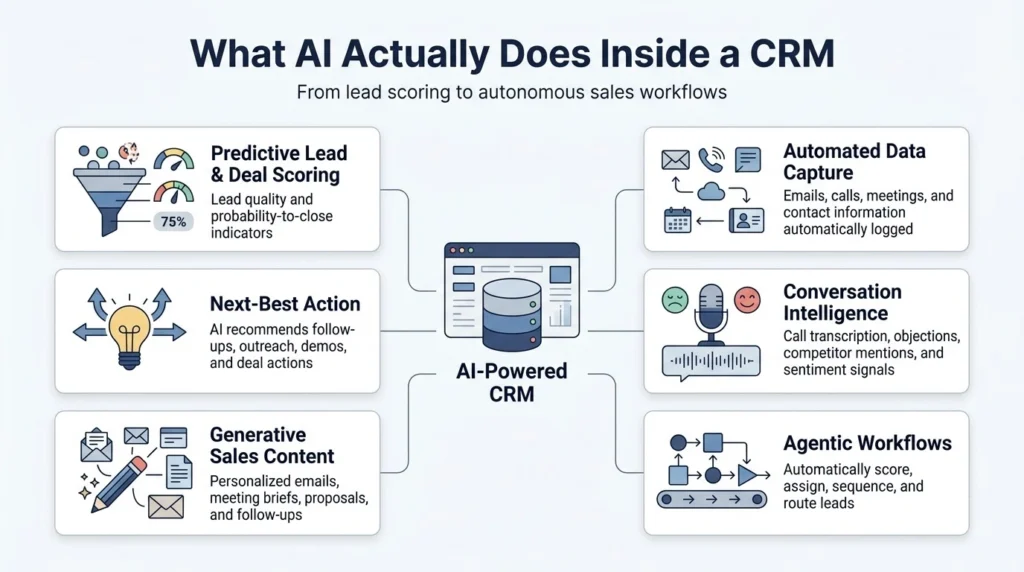
Strip away the marketing language and most “AI CRM” features fall into six buckets:
- Predictive lead and deal scoring. Models rank prospects by likelihood to close using historical win/loss data, engagement, and fit — so reps stop chasing leads that were never going to convert, per Salesmate.
- Autonomous data capture and enrichment. Emails, calls, and meeting notes get logged automatically, and contact records get filled in with title, company size, and tech stack without a rep touching a keyboard.
- Next-best-action and deal coaching. The system suggests what to do next — send a case study, loop in an exec, book a demo — and flags deals going quiet, which matters most for managers who can’t physically walk the floor and check in.
- Conversation and sentiment intelligence. Call and email transcription surfaces objections, competitor mentions, and churn signals in near real time.
- Generative drafting. AI writes personalized outreach, meeting-prep briefs, and follow-ups grounded in what’s actually in the CRM, which standardizes quality across a team that would otherwise write at wildly different skill levels.
- Agentic workflows. The newest layer: a lead matches your ICP, gets scored, gets assigned, and lands in a sequence automatically — no rep has to notice and act on it first.
Together, these are what’s actually behind the “shorter sales cycle, better forecast” numbers vendors advertise: fewer deals go stale from simple neglect, and forecasts run on model output instead of a rep’s gut feeling, per Autobound.
The Real 2026 Pricing Picture
This is where a lot of comparison articles go stale fast — AI pricing on these platforms has moved more in the last six months than CRM pricing typically moves in three years. Here’s what each one actually costs right now, not what it cost when the vendor first announced its AI features:
| Platform | Best Fit | Real Starting Price (2026) | Where the AI Actually Lives |
|---|---|---|---|
| Salesforce (Agentforce) | Complex enterprise sales already invested in Salesforce | Sales Cloud from around $25/user/mo; Agentforce itself bills separately via Flex Credits (~$500 per 100,000 credits) or per-conversation/per-resolution, not a flat seat fee | Genuinely the deepest AI suite here, but a serious rollout usually needs a Data Cloud subscription too — real first-year cost for a mid-market deployment commonly runs $150K–$600K once that’s added in |
| HubSpot (Breeze AI) | Mid-market teams that want marketing, sales, and service AI in one system | Free CRM; Sales Hub Starter around $15/user/mo, Professional around $100, Enterprise around $150 | Breeze Assistant is free at every tier; the Breeze Agents that actually do the work now bill on outcomes — $0.50 per resolved conversation, $1 per qualified lead — and only unlock on Professional or above |
| Pipedrive (AI Sales Assistant) | Small-to-mid sales teams who want a clean visual pipeline and not much else | $14–$69/seat/mo across four tiers (Lite, Growth, Premium, Ultimate); no free plan | Basic AI now ships from the entry tier; AI email drafting and deeper lead scoring open up from Premium |
| Freshsales (Freddy AI) | Early-stage and SMB teams that want a simple CRM without HubSpot-level complexity | Free for up to 3 users; Growth $9, Pro $39, Enterprise $59/user/mo | The AI most buyers actually want — Freddy Insights, for predictive scoring and forecasting — is a $100/user/month add-on on top of Pro, not something the base price includes |
| Zoho CRM (Zia) | Budget-conscious SMBs that want AI without a stack of separate invoices | Free for up to 3 users; Standard around $14; Enterprise $40/user/mo, where Zia unlocks; Ultimate $52 | Zia ships bundled once you’re on Enterprise or higher — no metered AI charges layered on top |
| monday CRM | Teams already running their business on monday’s work OS | From around $12/seat/mo, with AI features arriving from the Standard tier | Lighter AI depth than the sales-first platforms above, but it’s the only one on this list that also functions as general project management |
| GoHighLevel | Agencies and service businesses that want CRM, SMS, funnels, and booking under one roof, often white-labeled for clients | $97/mo (Starter), $297 (Unlimited), $497 (SaaS Pro) — flat rate, unlimited users | AI Employee is a separate add-on (roughly $97/mo), plus usage-based SMS and voice charges on top |
A pattern shows up once you look across all seven: the vendors are converging on two very different philosophies. Salesforce and HubSpot have both moved toward outcome- or consumption-based AI pricing in 2026 — you pay per resolved conversation or per action, which can be cheap at low volume and genuinely expensive at scale. Freshsales and GoHighLevel, by contrast, keep the base CRM cheap and gate the AI that actually matters behind a separate per-user add-on that rarely shows up in the headline price. Zoho is the outlier that just bundles it into one higher tier and stops there. None of these approaches is wrong, but only one of them fits your actual usage pattern — which is exactly what a sales demo won’t tell you.
Worth a mention outside the table: Microsoft Dynamics 365 with Copilot is the natural fit if your company already runs on Microsoft’s stack, and Attio has built a following among AI-native go-to-market teams that want something closer to a programmable database than a traditional CRM, per Autobound‘s rundown of the wider field.
How to Actually Evaluate an AI CRM (Without Getting Burned on Pricing)
- Name your actual bottleneck first. Losing leads to slow follow-up, unreliable forecasts, messy CRM data, or a remote team you can’t easily coach are four different problems with four different AI features attached — don’t shop the whole feature list at once.
- Price the AI tier you’d really need, not the entry sticker. A CRM advertised at $14/seat is a different product once you add the AI tier that makes it worth buying — model that number before you fall in love with the base price.
- Ask a sales rep to run your actual volume through their credit or session math. “$0.50 per resolved conversation” and “$1 per qualified lead” sound trivial until you multiply by your real ticket or lead volume for a month.
- Don’t judge predictive scoring in week one. Lead- and deal-scoring models typically need three to six months of historical activity data before the predictions are worth trusting, regardless of vendor.
- Check the compliance paperwork before any real customer data goes in. Confirm SOC 2 Type II, GDPR, and CCPA posture directly with the vendor rather than assuming, especially if you’re piloting with live pipeline data.
- Pilot on one team or one pipeline before rolling out company-wide. AI-driven workflow changes (auto-assignment, auto-sequencing) are much easier to unwind for one team than for an entire sales org.
- Put a pricing review on the calendar. Given how much AI pricing shifted at Salesforce, HubSpot, and Pipedrive in just the first half of 2026, a plan that’s a good deal today is worth re-checking every couple of quarters.
Which Platform Actually Fits Which Team
- Running a complex enterprise sales motion and already deep in the Salesforce ecosystem — Agentforce’s ceiling is higher than anything else here, but budget for Data Cloud and a real implementation timeline, not just the per-conversation rate.
- Mid-market team that wants marketing, sales, and support AI in one login — HubSpot’s Breeze suite is the most complete single-vendor answer, provided you’re comfortable with outcome-based billing on the agents that do the heavy lifting.
- Small, sales-only team that mainly needs a clean pipeline — Pipedrive gives you real AI without forcing you into an all-in-one platform you don’t need.
- Budget-conscious SMB that wants predictable, all-inclusive pricing — Zoho’s Enterprise tier is the closest thing here to “one price, AI included, no surprises.”
- Lean team that wants a working CRM with the least amount of add-on shopping — worth noting Freshsales’ base price is attractive, but budget for Freddy Insights separately if predictive scoring is why you’re buying it.
- Agency or service business managing several clients’ pipelines under one brand — GoHighLevel’s flat per-account pricing and white-labeling beat anything charging per seat once you’re managing multiple client accounts.
- Team that already lives inside a work-management tool — monday CRM keeps sales data next to the rest of your operational work, at the cost of some AI depth versus the sales-first platforms.
Bottom Line
There’s no single best AI CRM in 2026 — there’s a best fit for your team size, sales motion, and how much AI you’ll genuinely use every month. The teams getting real value aren’t necessarily on the platform with the most AI features; they’re the ones who priced the AI tier honestly before signing, piloted with one team first, and gave the model enough historical data to actually be useful before judging it.
also checkout – Best AI-Powered Project Management Tools for Remote Teams in 2026
FAQs
What is an AI-powered CRM, and how is it different from a regular CRM?
An AI CRM uses machine learning and natural-language processing to score leads, log activity automatically, recommend next steps, and analyze call or email sentiment — turning what used to be a passive contact database into a system that actively tells reps and managers what to do next, per Salesmate.
Which AI CRM is best for small businesses or agencies?
For straightforward SMB sales teams, Pipedrive, Freshsales, and Zoho’s Enterprise tier deliver the strongest AI-per-dollar. For agencies juggling multiple client accounts, GoHighLevel, HubSpot, and monday CRM handle multi-client workflows and white-labeling better than the sales-only tools.
Do AI CRMs actually improve sales performance, or is that just marketing?
The data backs it up: teams using AI report meaningfully faster sales cycles, higher conversion rates, better forecast accuracy, and real time saved on admin work compared with teams that don’t, with AI-adopting teams showing substantially higher average sales growth, per Autobound.
Are AI CRMs secure and compliant with GDPR and CCPA?
The major platforms covered here maintain SOC 2 Type II and GDPR/CCPA-relevant certifications and offer role-based access, encryption, and audit logging, per ZoomInfo’s Pipeline team — but certifications and actual configuration are two different things, so confirm current attestations and data-residency settings directly with the vendor before connecting real customer data.