
Best AI-Powered Project Management Tools for Remote Teams in 2026
Best AI-Powered Project Management Tools for Remote Teams in 2026
For US, UK, and Canadian remote teams, the strongest AI-powered project management platforms in 2026 are ClickUp Brain, Asana AI, monday.com AI, Jira with Rovo, and Notion AI. The right pick depends on whether your team needs all-in-one flexibility, structured governance, visual workflows, software delivery support, or documentation-first collaboration.
Most “best PM tool” roundups still compare features that stopped mattering two product cycles ago. The real dividing line in 2026 isn’t whether a platform has an AI button bolted on — it’s whether that AI actually understands your project context, flags risk before a deadline slips, and takes action instead of just summarizing what already happened. Here’s how the category has changed, how the five leading platforms stack up, and how to pick the right one without burning a quarter on a rollout that doesn’t stick.
Table of Contents
Why Remote Teams Are Switching to AI Project Management Software
AI adoption in business is climbing across all three markets, though the numbers vary depending on how you measure them. In the US, Federal Reserve analysis of Census Bureau survey data puts firm-level AI adoption at roughly 18% by the end of 2025, with over 20% of firms expecting to be using AI in the first half of 2026. The UK is moving faster: the Office for National Statistics reported that 23% of businesses were using some form of AI by late September 2025, up from just 9% when the question was first introduced in September 2023. Canada is earlier in the curve — Statistics Canada found 12.2% of businesses were using AI to produce goods or deliver services in Q2 2025, up from 6.1% a year earlier, with another 14.5% planning to adopt within 12 months.
Worth flagging up front: none of these numbers measure AI project-management adoption specifically. They cover broad business AI use — chatbots, analytics, generative tools, automation — lumped together. Treat any headline claiming “X% of companies use AI project management software” with skepticism unless the source defines its terms that precisely, because as of now, no one publishes that number cleanly.
Best AI-Powered Project Management Tools for Remote Teams in 2026
What’s easier to measure is how permanent hybrid work has become. In the UK, 28% of working adults worked a hybrid arrangement between January and March 2025, and the CIPD’s 2025 research found 41% of employers believe hybrid work has improved productivity or efficiency, against just 16% who think it’s hurt output. A randomized study of more than 1,600 employees at Stanford found that working from home two days a week had no negative effect on productivity or promotions — and meaningfully improved retention.
Put those two trends together and you get the actual reason AI project management software is having a moment: hybrid and remote work aren’t going anywhere, and tools built for co-located teams were never designed to answer “what’s blocked?” or “who owns the delayed deliverable?” when the answer is scattered across Slack, five Google Docs, and a stand-up nobody quite remembers.
From AI Assistance to AI Orchestration in Project Management
For the past couple of years, “AI in project management” mostly meant a summarize button and a chatbot that could answer questions about a task. That’s no longer the ceiling. The 2026 shift is from AI assistance — helping a human do a task faster — to AI orchestration, where agents read context across a workspace and execute multi-step work themselves.
Asana’s current AI lineup is a good example of how far this has moved: AI Teammates, AI Studio, AI Connectors, and Asana Dash, all built around what the company calls an agentic work-management model. ClickUp’s overlapping bet is meeting-to-task automation — AI transcription, summaries, and automated progress updates that convert a stand-up recording directly into assigned, deadline-stamped tasks, cutting into the meeting-heavy management style that distributed teams tend to resent most.
The catch with “agentic” features is that the label alone tells you almost nothing about whether they’re safe to turn on. The question that actually matters is whether the platform gives you permission controls, activity logs, approval gates, and predictable failure handling — not whether the marketing page uses the word “agent.”
Top 5 AI-Powered Project Management Tools for Remote Teams
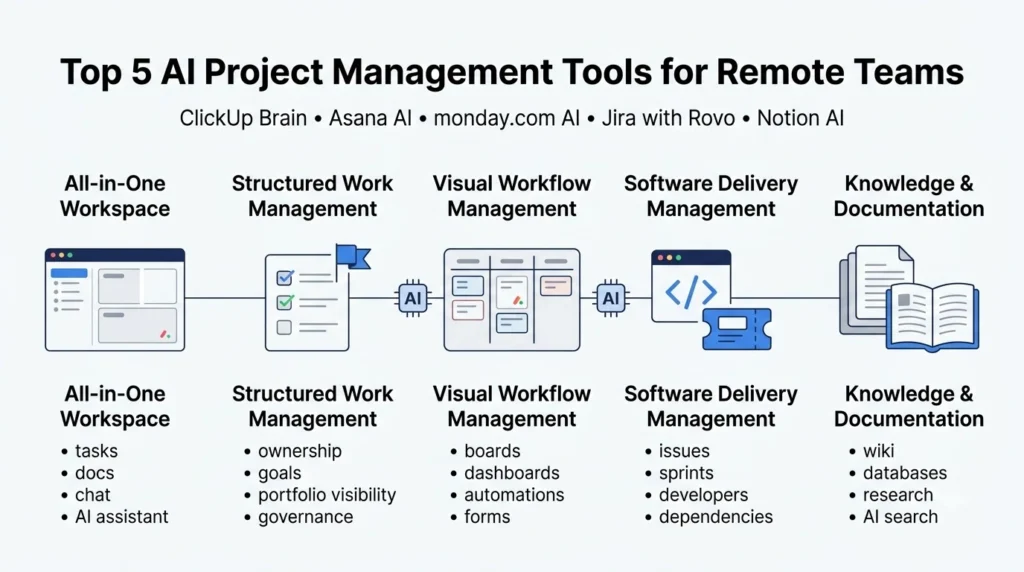
Here’s how the five leading platforms compare for distributed teams, based on their current AI feature sets and where each one tends to shine or struggle in daily use.
1. ClickUp Brain — Best All-in-One Workspace for Agencies and Small Businesses
ClickUp Brain connects tasks, Docs, Chat, and company knowledge inside one workspace, so it can answer questions about the workspace itself, draft project plans, generate status reports, take AI meeting notes, and trigger task actions or automated workflows without switching tools. Its AI project-plan generator is particularly strong for agencies: feed it a brief and it builds a timeline, sequences dependencies, and flags resource constraints, then keeps updating the plan as priorities and task status shift.
The trade-off is the same one ClickUp has always had: near-limitless configurability means near-limitless ways to build a messy workspace. Teams that don’t invest in a shared setup convention end up with sprawl — inconsistent statuses, duplicate spaces, and a steeper learning curve for anyone who isn’t already a power user.
Best for: Agencies and small businesses that want a single “tasks + docs + chat + AI” hub instead of five separate tools.
2. Asana AI — Best for Structured, Governance-Friendly Execution
Asana’s AI features lean into ownership and accountability rather than raw flexibility. Smart summaries and risk and blocker detection operate at both the project and portfolio level, and AI Studio lets non-technical admins build no-code workflows for checking, classifying, routing, alerting, and reporting — priced separately from the core plan, with a Plus tier running $135/month billed annually (or $150 month-to-month) for 100K monthly credits, and usage-based Pro pricing for heavier workflows. Asana states its AI partners don’t train models on customer data and must delete it once a query completes — a reasonable governance posture, though it’s a vendor claim worth verifying against your own contract and compliance requirements rather than taking at face value.
The trade-off: Asana is less suited to teams that want a single environment combining freeform docs, chat, and highly custom databases. If that’s the priority, ClickUp or Notion will feel more natural.
Best for: Cross-functional teams that need clear ownership, portfolio visibility, and an audit trail for AI actions.
3. monday.com AI — Best for Visual, Non-Technical Teams
monday.com’s board-based interface remains its biggest advantage for marketing, sales, creative, and agency operations teams who find issue trackers and nested docs intimidating. AI blocks, automations, dashboards, and intake forms sit directly on top of the visual boards people already know how to use.
The trade-off shows up at scale: large monday.com workspaces get hard to govern, and AI features are often gated by credit limits or plan tier. Before standardizing across an organization, check the AI-credit allowance, permission depth, and reporting depth on your specific plan — these vary more than the marketing pages suggest.
Best for: Visual operations, marketing, sales, and creative teams that need approachable AI without an engineering-heavy setup.
4. Jira with Rovo — Best for Software Delivery and Engineering Teams
Jira with Rovo is the only platform on this list built around issue-based delivery from the ground up, and it shows in the AI feature set: AI-assisted issue creation, work-item summaries, backlog and sprint planning support, and automated sprint recommendations based on capacity, priority, dependencies, and historical velocity. Rovo’s cross-tool context also connects to Confluence, Slack, email, and development environments — which matters for engineering orgs juggling code, docs, and tickets at once.
The trade-off is fit: Jira’s issue-based model is often more structure than a marketing, client-service, HR, or small-business team actually needs. If your work doesn’t naturally break into tickets, Rovo’s AI won’t fix that mismatch.
Best for: Software, product, and DevOps teams running parallel technical workstreams.
5. Notion AI — Best for Documentation-Heavy, Knowledge-Centric Teams
Notion AI’s strength is treating project work and institutional knowledge as the same problem. Wiki pages, project databases, research notes, meeting notes, and AI writing or summarization all live in the same flexible block-based system, with workspace search that spans the lot.
The trade-off is that Notion’s project-management muscles — capacity planning, dependency management, portfolio-level reporting — are thinner than a dedicated PM tool’s and usually need extra configuration or a companion app to match what ClickUp, Asana, or Jira offer natively.
Best for: Consultancies, startups, and product teams where documentation and research matter as much as task tracking.
ClickUp Brain vs Asana AI vs monday.com AI vs Jira with Rovo vs Notion AI: Quick Comparison
| Platform | Best Fit | AI Strengths | Main Trade-Off |
|---|---|---|---|
| ClickUp Brain | Small businesses & agencies wanting an all-in-one hub | Tasks + Docs + Chat + knowledge base; AI project plans, status reports, notetaking, automated workflows | Flexibility can create workspace sprawl and a steeper learning curve |
| Asana AI | Cross-functional teams needing governance | AI Teammates, AI Studio, risk/blocker detection, portfolio status | Less flexible than ClickUp/Notion for custom databases or a single docs-chat-task space |
| monday.com AI | Visual, non-technical, agency operations | Board-based AI blocks, automation, dashboards, intake forms | Governance gets harder at scale; watch AI-credit and plan limits |
| Jira with Rovo | Software delivery & engineering | AI issue creation, sprint planning, cross-tool dev context | Often too much structure for non-technical, non-issue-based teams |
| Notion AI | Documentation-heavy, knowledge-centric teams | Wiki + database + writing + workspace search in one system | Weaker native capacity planning, dependencies, and portfolio reporting |
Core AI Features to Evaluate in Project Management Software
Every vendor calls itself “AI-powered” now, so the feature list matters less than which of these your team will actually use:
- Natural-language task creation — turn a prompt like “build a six-week SEO migration project” into tasks, owners, dependencies, and deadlines instead of building the structure by hand.
- AI project-plan generation — auto-drafted timelines and dependency maps from a short brief. Treat the output as a draft, especially where budgets or contractual milestones are involved.
- Automated sprint and workload planning — recommends what enters the next sprint based on capacity, priority, and historical velocity. Most valuable for software and technical teams.
- Predictive risk and deadline analysis — flags overdue work, stalled tasks, and dependency conflicts before they become a status-meeting surprise.
- Meeting-to-task transcription — converts meeting recordings into decisions, owners, and follow-ups automatically. Check how well it maps decisions back to specific projects, not just how accurate the transcript is.
- AI-generated status reports — turns task, comment, and milestone activity into client updates, executive summaries, or sprint reports without manual compilation.
- Natural-language workspace search — lets you ask “which projects have unresolved client feedback and a deadline inside 10 days?” instead of digging through five tools.
- AI workflow automation — classifies incoming requests, routes them, and triggers approvals without custom engineering.
- Agentic execution — multi-step actions (creating tasks, updating statuses, generating reports) triggered by a natural-language instruction. Evaluate the permission controls and audit trail, not the “agent” label.
- Governance and security controls — role-based access, audit trails, data-retention settings, and disclosure of which AI models process your data.
How to Choose the Right AI Project Management Tool for Your Remote Team
- Audit your actual coordination overhead. Before comparing feature lists, track where your team loses time — status meetings, duplicate status updates, chasing approvals — for one working week. That list becomes your evaluation criteria.
- Separate must-haves from nice-to-haves. An engineering team needs sprint planning and dev-tool context more than AI-generated client reports; an agency usually needs the reverse. Rank features against your audit, not the vendor’s homepage order.
- Map integration requirements against your existing stack. Check Slack or Teams, Google Workspace or Microsoft 365, Zoom or Meet, GitHub or GitLab, and your CRM. A platform with excellent AI but a weak integration with your daily tools gets worked around within a month.
- Vet governance and data policies before you vet features. Ask directly: does the AI train on your data, how long is data retained, what’s the audit trail, and can you restrict which sources the AI references? Get this in writing, not just off the pricing page.
- Run a two- to four-week pilot with one team. Pick a real, active project — not a sandbox — and measure against your baseline from step 1, not against how impressive the demo looked.
- Set outcome metrics before you scale, not after. Decide upfront what “working” looks like: fewer status meetings, faster handoffs, lower rework, on-time delivery rate. Adoption numbers alone don’t tell you whether the tool is actually helping.
Problems AI Project Management Tools Solve for Remote Teams
- Fewer status meetings, not more dashboards. Async digests, AI summaries, and exception-based escalation — only surfacing what’s actually at risk — replace recurring “everyone give an update” meetings more effectively than another dashboard nobody checks.
- Productivity visibility without surveillance. The healthier signals are outcome-based: milestone completion, cycle time, blocked-task age, rework rate, on-time delivery, and workload balance — not keystroke or activity monitoring.
- Tasks stop falling through the cracks. Dependency alerts, overdue-task detection, and automated escalation rules catch what a manual weekly review misses, especially across time zones.
- Agencies can run more clients without more PMs. Reusable templates, client guest access, time tracking, and branded AI-generated status reports are what let an agency scale client count without scaling headcount 1:1.
Data Security and Governance in AI Project Management Tools
Before rolling AI project management out past a pilot, get clear answers on: role-based access and workspace permissions, audit trails for AI-initiated actions, data-retention windows, whether your data trains vendor or third-party models, and whether you can restrict which internal sources the AI is allowed to reference. Vendor statements on these points — including the governance claims Asana and others publish — are a reasonable starting point, but they’re marketing copy until your legal or IT team has verified them against your actual contract, your industry’s compliance requirements, and, for UK and Canadian teams specifically, your data-residency obligations.
The Bottom Line: Which AI Project Management Tool Should You Choose?
- If you want one workspace that replaces five tools, ClickUp Brain is the strongest all-in-one bet.
- If governance, ownership, and portfolio visibility matter more than flexibility, Asana AI is the safer default.
- If your team lives in visual boards and doesn’t want an engineering-heavy setup, monday.com AI fits best.
- If you’re running software delivery, Jira with Rovo is purpose-built for that workflow — nothing else on this list comes close for engineering teams.
- If documentation and institutional knowledge matter as much as task tracking, Notion AI is the better foundation.
No single platform wins on every axis. The fastest way to pick wrong is optimizing for the longest AI feature list instead of the coordination problem your team actually has.
Frequently Asked Questions About AI Project Management Tools
What are the best AI project management tools for remote teams?
ClickUp Brain, Asana AI, monday.com AI, Jira with Rovo, and Notion AI currently lead the category for US, UK, and Canadian remote teams. Which one is “best” depends on team size, workflow type, integration needs, and how much governance and structure you need versus flexibility.
Can AI project management tools create tasks automatically from meetings?
Yes — most leading platforms can transcribe or summarize meetings and extract action items, but accuracy, automatic task assignment, supported meeting platforms (Zoom, Teams, Google Meet), and approval workflows vary significantly between tools. Test this with your team’s actual meeting format before assuming it works out of the box.
Is AI project management software secure for client and business data?
It can be, but security depends on the platform’s encryption, access permissions, data-retention policy, and whether your data is used to train AI models. Review each vendor’s AI-specific data policy separately from its general security page, and verify governance claims against your own compliance requirements rather than taking them at face value.
Can AI actually predict whether a project will be late?
AI risk scoring can flag warning signs — stalled tasks, dependency conflicts, workload imbalance, declining activity — earlier than a weekly status meeting would catch them. But predictive accuracy depends entirely on clean historical data and consistent status updates from your team; it’s an early-warning indicator, not a guarantee.
also checkout this – True AI Stock Analysis and Portfolio Management Tools: The 2026 Guide
Sources & Further Reading
- Federal Reserve — Monitoring AI Adoption in the U.S. Economy
- UK Office for National Statistics — Business Insights and Impact on the UK Economy
- Statistics Canada — AI Use in Canadian Businesses
- Statistics Canada — AI Operational Integration
- Stanford — Hybrid Work Study
- UK Hybrid Workforce Statistics
- Asana AI Product Page
- Asana AI Studio
- Asana AI — Goals & Reporting
- ClickUp Features
- ClickUp AI Project Plan Generator
- ClickUp Brain
- ClickUp — Instant Situation Awareness
- Atlassian — Jira AI (Rovo)