
AI Executive Assistant Tools: How Leaders Are Actually Saving Time in 2026
best AI Executive Assistant Tools: How Leaders Are Actually Saving Time in 2026
AI executive assistant tools can genuinely save leaders several hours a week on email, meetings, and document review — but the widely quoted “15 hours a week” figure is a best-case target for heavy users with a fully integrated setup, not a typical average. Most published research points to a realistic range of roughly 2 to 10 hours saved weekly, with 15 hours reachable only when someone combines a strong embedded copilot, well-configured agents, and disciplined workflow redesign.
Where the “15 Hours a Week” Number Actually Comes From
This figure gets repeated a lot, and it’s worth knowing what’s actually behind it before you set expectations around it. OpenAI’s 2025 enterprise report found that workers using AI reported saving 40–60 minutes per day on average, with heavy users saving more than 10 hours per week. Microsoft’s research found roughly a third of leaders said AI saved them more than an hour a day. Google reported an average of 105 minutes per week saved among enterprise customers using Gemini for Workspace, and a Forrester economic-impact study put the average closer to three hours per week for a composite organization. best AI Executive Assistant Tools: How Leaders Are Actually Saving Time in 2026
Every one of those is a vendor-commissioned or vendor-published number, which doesn’t make them false, but it does mean they shouldn’t be treated as a universal benchmark for your specific role. The honest read: 2–10 hours a week is where most users land, and 15 hours is achievable for someone who has restructured their actual workflow around AI, not just added a chatbot on the side.
Table of Contents
Why US and UK Adoption Numbers Don’t Match Each Other
If you’ve seen wildly different adoption statistics for the same year, that’s not an error — different surveys measure different things.
- The U.S. Chamber of Commerce found 58% of US small businesses used generative AI in 2025, up from 40% in 2024 and 23% in 2023 — one of the fastest technology-adoption curves the Chamber has tracked.
- PwC’s May 2025 survey of 308 US executives found 79% said AI agents were already being adopted at their companies, and 88% expected to increase AI-related budgets over the next 12 months. PwC’s own follow-up analysis adds an important caveat: broad adoption doesn’t always mean deep use — many of those “adopted” cases are employees using agentic features bolted onto existing apps, not a redesigned workflow.
- In the UK, government DSIT research (based on roughly 3,500 business interviews, using a stricter definition of “using AI”) puts adoption at 16%, while the Office for National Statistics — tracking businesses with 10 or more employees — reports a higher figure, generally in the low-to-mid 20s. The gap comes down to sample and definition, not disagreement about the trend, which is up in every version.
Also Checkout the – best AI Invoicing and Cash-Flow Forecasting: The 2026 Guide for Startups
What an AI Executive Assistant Actually Does
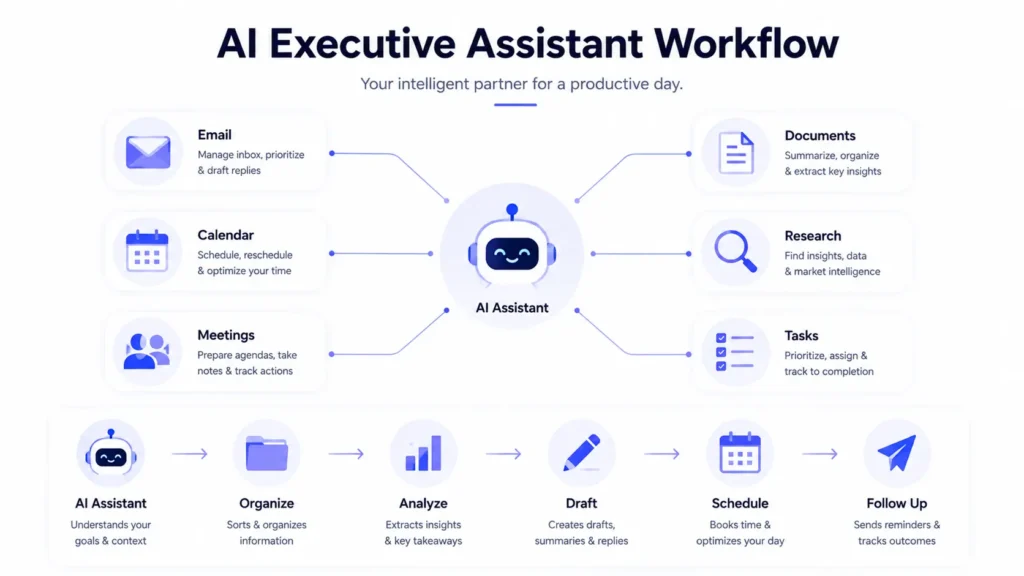
- Inbox triage and drafting — classifying messages by urgency, summarizing long threads, and drafting replies in your tone, flagging what actually needs your personal attention.
- Calendar management — finding meeting times across time zones, protecting focus blocks, and resolving scheduling conflicts.
- Meeting intelligence — transcribing calls, producing summaries, and — more usefully than the transcript itself — connecting decisions made in the meeting to the follow-up tasks they create.
- Executive briefings — a morning or weekly brief covering priority emails, calendar risk, sales activity, financial metrics, and unfinished commitments.
- Document analysis — reviewing board materials, contracts, and reports to extract risk, compare versions, and produce a decision memo instead of a full re-read.
- Research and competitive intelligence — monitoring news, filings, and competitor activity and synthesizing it into a briefing (verify anything load-bearing against the primary source before you act on it).
- CRM and sales support — summarizing account history, prepping meeting briefs, and drafting follow-ups.
- Financial and operational analysis — querying spreadsheets and dashboards in plain language to explain a change in revenue, margin, or pipeline.
- Agentic execution — the newer category: an assistant that reads an email, checks the CRM, drafts a response, creates a follow-up task, and asks for approval before sending, rather than just answering a question.
Comparing the Best AI Executive Assistant Tools
| Tool | Best Fit | Strengths | Watch Out For |
|---|---|---|---|
| Microsoft 365 Copilot | Executives whose org runs on Microsoft 365 | Deep integration with Outlook, Teams, Word, Excel, and PowerPoint | Licensing and data-governance setup can get complex |
| Google Workspace with Gemini | Startups and agencies built on Gmail and Drive | Native support across Gmail, Docs, Sheets, and Meet | Cross-system automation outside Workspace needs extra configuration |
| ChatGPT Business/Enterprise | Flexible research, writing, and analysis across functions | Strong general-purpose reasoning and file review | Needs separate connectors for calendar, CRM, and other transactional workflows |
| Claude for Work/Enterprise | Long-document analysis and careful written reasoning | Strong at board papers, contracts, and strategy documents | Less natively embedded in email/calendar unless connected via additional tools |
| Specialist tools (Motion, Reclaim, Lindy, Clara) | A dedicated scheduling or workflow layer on top of whatever you already use | Sharper, more focused automation than a general chatbot | Each is narrower than it sounds — Clara, for instance, is specifically an email-CC scheduling assistant, not a full inbox/task manager, and runs $80+/month |
The selection rule that matters most: pick the assistant native to your existing productivity suite before layering on specialist tools — integration and adoption tend to matter more than small differences between models. A small digital agency generally does best with Google Workspace/Gemini or Microsoft 365 Copilot plus a dedicated meeting-notes tool. A solo founder usually does better with one general assistant for research and drafting, one calendar/inbox automation layer, and one clear source of truth for CRM and tasks — not five overlapping subscriptions.
A Sample 15-Hour Workflow: What to Automate First
This is an illustrative framework for how the hours in a best-case week might break down — not an independently verified average, since no single study measures exactly this split.
- Inbox and communication support (≈4 hours) — triage, summarization, and drafted replies.
- Meeting preparation and follow-up (≈3 hours) — briefs before calls, action items and owners captured after.
- Document analysis (≈3 hours) — contracts, reports, and proposals reduced to a decision memo.
- Scheduling (≈2 hours) — calendar coordination and conflict resolution.
- Research (≈2 hours) — competitive and market monitoring, synthesized into a briefing.
- Reporting (≈1 hour) — recurring dashboards and status updates generated automatically.
Start with whichever bucket is costing you the most real hours today, not the one with the flashiest demo — the ROI shows up fastest where the pain already is.
Controls to Require Before You Delegate to AI
- Approval required before any external message or purchase goes out autonomously.
- Source citations on anything research-based, so you can verify before acting on it.
- Activity logs you can actually review, not just a claim that logging exists.
- Role-based access and confidential-data restrictions, especially for board materials and financial data.
- Human review on anything legal, financial, or otherwise consequential — no exceptions while the system is new.
- An easy rollback path if an agent takes an action you need to undo.
Common Mistakes Executives Make
- Chasing 15 hours in week one. That number is a ceiling reached after workflow redesign, not a starting point — expect 2–5 hours initially and build from there.
- Turning off human review to save a few extra minutes. The controls exist because autonomous mistakes on external communication or payments are expensive to unwind.
- Buying a specialist tool before the core assistant is actually adopted. A scheduling app on top of an unused Copilot license adds cost without solving the underlying problem.
- Treating vendor-reported time savings as guaranteed. OpenAI’s, Google’s, and Microsoft’s own numbers are a reasonable directional signal, not a benchmark your results are supposed to match exactly.
FAQs
Can AI assistants really save executives 15 hours per week? For heavy users with a fully integrated workflow, yes — but 15 hours is a best-case target, not a typical result. Published evidence ranges from about 105 minutes per week for some enterprise Workspace users up to 10+ hours for heavy AI users, so treat any single number as one data point rather than a guarantee.
What is the best AI executive assistant for business leaders? Microsoft 365 Copilot fits Microsoft-centric organizations, Gemini fits Google Workspace companies, and ChatGPT or Claude for Work suit flexible research, drafting, and long-document analysis. Specialist tools like Motion, Reclaim, or Lindy are worth adding once scheduling or inbox automation specifically is the bottleneck.
What tasks should executives automate with AI first? Start with low-risk, repetitive work — email summaries, meeting notes, calendar coordination, and research briefs. Hold off on autonomous financial, legal, HR, or external-communication actions until your approval controls have actually been tested.
Will AI executive assistants replace human executive assistants? More likely to change the role than eliminate it. AI handles summarization, scheduling, and routine coordination well; human assistants remain valuable for judgment, discretion, relationship management, and the exceptions that don’t fit a workflow.