
AI BI Tools for Small Business: 2026 Guide
AI BI Tools for Small Business: 2026 Guide. AI business intelligence tools now let you ask a plain-English question about your data and get a chart and explanation back in seconds, instead of waiting days for an analyst to pull a report. Julius AI is the fastest starting point for ad-hoc analysis without a data warehouse, Power BI with Copilot suits Microsoft-centric teams, Tableau with Pulse leads for Salesforce-heavy visualization needs, and ThoughtSpot fits teams with an existing warehouse wanting search-style analytics.
Table of Contents
Why This Matters Right Now
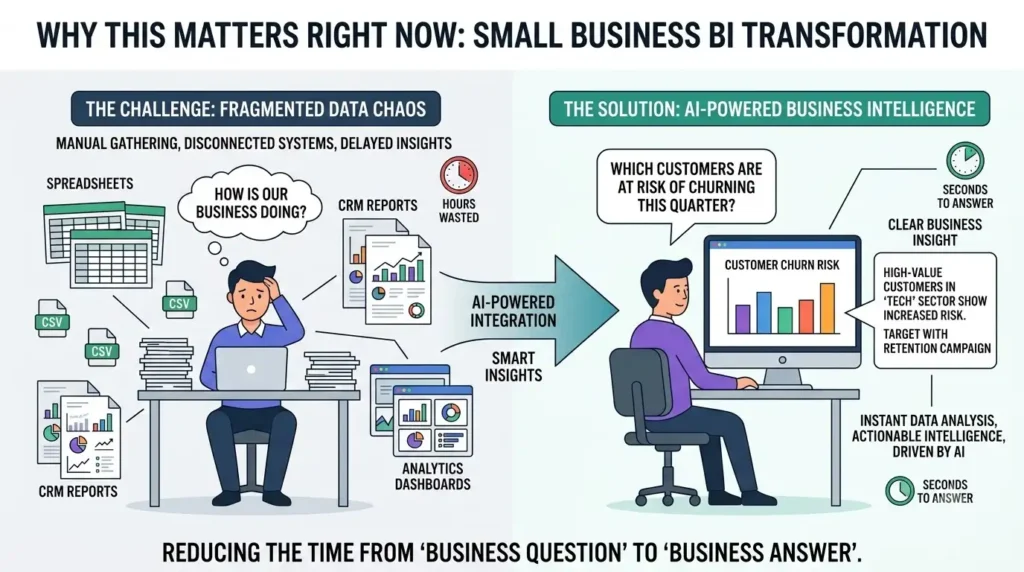
AI BI Tools for Small Business: 2026 Guide. The core problem this category solves is well-documented across the industry, even where specific adoption percentages vary by survey: getting from “I have a business question” to “I have an answer” typically takes far too long when it depends on exporting CSVs, writing SQL, and waiting on a scarce analyst. Small-business AI adoption overall has climbed steadily and consistently across every credible tracking series over the past two years — that trend is well-established regardless of which specific survey you check. What’s newer and more specific to this category: natural-language querying has gotten good enough that a non-technical user can genuinely get a useful answer without SQL, which wasn’t reliably true even a year or two ago.
What These Tools Actually Do
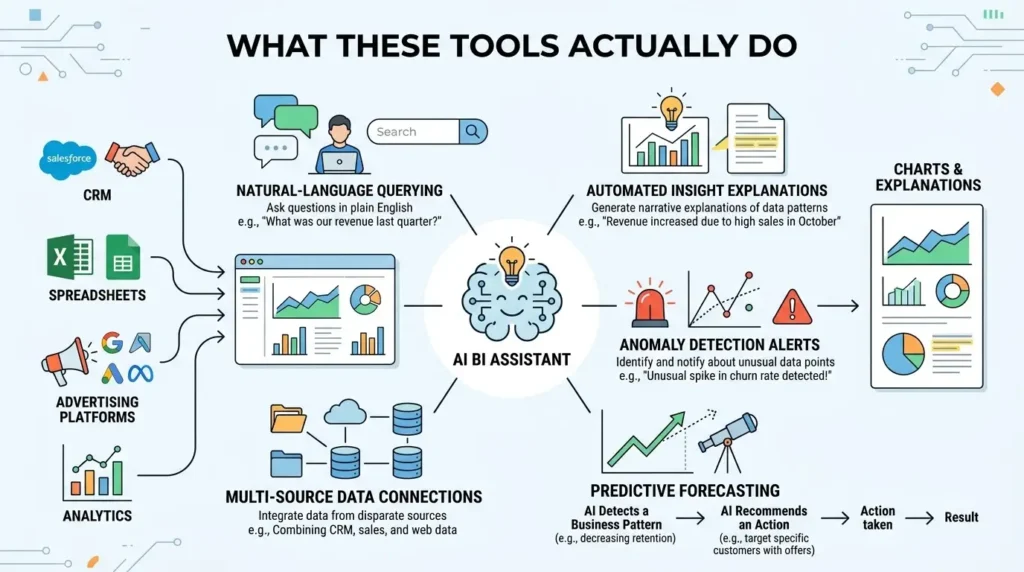
- Natural-language querying (NLQ) — ask “which channel drove the most revenue last quarter” and get a chart with an explanation, no SQL required.
- Insight explanations, not just charts — the better tools explain why a metric moved (a campaign paused, a platform update affecting traffic) instead of just showing the line went down.
- Automated anomaly detection — continuous monitoring that flags unusual spikes or drops and pushes an alert to Slack or email before a budget quietly burns through.
- Predictive forecasting — revenue, churn, or demand forecasts with confidence intervals based on historical patterns, useful for setting realistic targets.
- Multi-source connectors and auto data prep — native connections to CRM, ad platforms, and web analytics, with AI handling the cleaning and joining that used to require an engineer.
- Emerging agentic workflows — a few platforms now go beyond insight generation to trigger an action directly (reassign a lead, pause a campaign) based on a detected pattern, though this is still early and worth testing carefully before trusting it unsupervised.
Comparing the Top Platforms
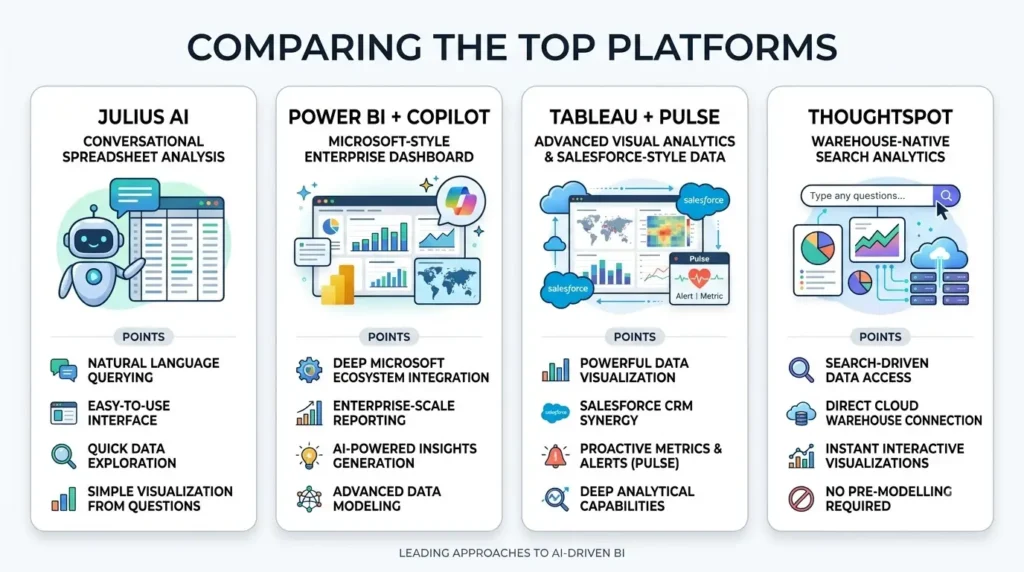
| Tool | Best For | Key Strength | Starting Price |
|---|---|---|---|
| Julius AI | Individual analysts and small teams without a warehouse | Conversational analysis, fast setup, no code required | Free tier; paid plans roughly $20-45/mo |
| Power BI + Copilot | Microsoft 365 / Fabric-based teams | Deep Microsoft ecosystem integration, strong enterprise features | ~$10-14/user/mo, plus Fabric capacity for Copilot |
| Tableau + Pulse | Visualization-heavy orgs, Salesforce ecosystems | Best-in-class visualization, proactive summaries to Slack/Teams | Creator tier from ~$75/user/mo |
| ThoughtSpot | Teams with an existing data warehouse | Search-style NLQ on governed, warehouse-native data | From ~$25/user/mo, requires existing warehouse |
Worth knowing about beyond this core four: Polymer turns a spreadsheet into a dashboard with very little setup, a reasonable fit for a small team not ready for a full BI platform, and Databox packages an AI analyst alongside anomaly detection on flat-fee plans — a different pricing shape than the per-seat tools above, worth comparing directly against your actual team size. Pricing across this whole category changes often; confirm current rates directly before budgeting.
The selection logic that matters: if you’re already deep in Microsoft 365, Power BI with Copilot is the path of least resistance — the integration value compounds. If your team lives in Salesforce and cares most about polished, shareable visualizations, Tableau’s the stronger fit despite the higher price. If you already have a governed data warehouse (Snowflake, BigQuery), ThoughtSpot’s search-native approach is built for exactly that setup. And if none of that applies — you just need fast answers from spreadsheets or a few connected sources without a warehouse — Julius AI is the lowest-friction starting point.
Choosing by Stack
- Check what you already have before adding a platform. A warehouse-native tool like ThoughtSpot is wasted without a warehouse; a Microsoft-integrated tool is wasted outside a Microsoft-centric stack.
- Test the “under 60 seconds” bar yourself. Give your least technical team member a real question and see if they get a usable answer without training — that’s a better test than any feature list.
- Price out your actual seat count, not the advertised per-seat rate — per-seat models scale linearly and can surprise finance at 20-50 users.
- Confirm the tool explains its answers, not just displays them — a chart with no explanation of why a metric moved doesn’t actually save the analyst time it claims to.
- Pilot on one team’s real reporting cycle before rolling out broadly, and measure whether it actually compressed the time from question to decision.
Common Mistakes Teams Make
- Buying enterprise depth before you need it. A five-person team doesn’t need Tableau’s full governance stack — start with the lightest tool that solves your current bottleneck.
- Trusting an anomaly alert without checking the underlying data quality. Garbage connections produce confident-looking false alarms just as easily as real ones.
- Ignoring the warehouse requirement. Tools like ThoughtSpot assume governed, connected data already exists — check this before falling in love with the demo.
- Letting agentic features act without review. Automatically pausing a campaign or reassigning a lead based on a detected pattern is powerful, but worth a human check until the tool has a track record on your actual data.
also checkout – Best AI Cold Email Tools for Agencies in 2026
FAQs
What is the best AI business intelligence tool for a small business? It depends on your stack: Power BI with Copilot fits Microsoft-centric teams, Julius AI suits spreadsheet-first teams without a warehouse, ThoughtSpot fits teams with an existing data warehouse, and Tableau with Pulse leads for Salesforce-heavy visualization needs.
Can non-technical teams use AI data tools without SQL? Yes — modern tools support natural-language queries and auto-generated charts with explanations. The real test is whether your least technical user gets a useful answer in under a minute without training, not whether the tool advertises “no-code.”
Do AI analytics tools actually replace manual spreadsheets and SQL reporting? For routine KPI monitoring, anomaly detection, and recurring reporting, largely yes. For custom machine-learning modeling or highly complex data transformations, you’ll likely still need a data engineer or dedicated analytics platform.
What AI features should I prioritize when choosing a BI tool? Natural-language querying, explanations of why a metric changed (not just that it changed), anomaly alerts, forecasting, and integrations with the specific tools already in your stack — those compress the time from question to decision more than any other feature set.
Sources
- Power BI, Tableau, ThoughtSpot, Julius AI — official product and pricing pages, current as of publication; verify before republishing
- Small-business AI adoption trend confirmed against Intuit QuickBooks’ ongoing survey series, previously verified in earlier research for this publication
1 thought on “best AI BI Tools for Small Business: 2026 Guide”